
A deep dive into how VK’s Long Poll works, building a sniffer to intercept events, and discovering undocumented event codes.
Introduction
While developing VKify, a browser extension to enhance VKontakte functionality, I faced an interesting challenge: tracking user actions in real-time — who’s typing, who read a message, who deleted it.
Official VK API documentation for Long Poll exists, but it’s incomplete and partially outdated. Many event codes are undocumented, and the data structure can differ from what’s described. I had to reverse engineer the protocol myself.
In this article, I’ll cover:
- What Long Poll is and why it matters
- How to intercept network requests in the browser
- How I built a sniffer for event analysis
- What pitfalls I encountered (spoiler: online status might go through WebSocket)
- Ready-to-use code you can use
What is Long Poll?
Long Polling is a technique for receiving real-time updates from a server. Unlike regular requests, the client sends a request and the server keeps the connection open until new data arrives or a timeout occurs.
VKontakte uses Long Poll for instant event delivery:
- New messages
- “Typing…” status
- Message read receipts
- Message deletion
- And much more
Requests go to an endpoint like:
https://api.vk.com/ruimXXXXXXXXX?version=21&mode=682
Where XXXXXXXXX is your user ID.
Step 1: Basic Fetch Interception
Let’s start with basic interception. The idea is simple: override the global fetch function, analyze responses, and pass them through.
/**
 * Basic Long Poll Interceptor
 * Paste into browser console on any VK page
 */
(function() {
  const originalFetch = window.fetch;

  window.fetch = async function(url, options) {
    const response = await originalFetch.apply(this, arguments);
    const urlStr = url?.toString() || '';

    // Only catch Long Poll requests
    if (/api\.vk\.com\/ruim/.test(urlStr)) {
      try {
        const clone = response.clone();
        const data = await clone.json();

        if (data.updates && data.updates.length > 0) {
          console.log('[Long Poll] Events received:', data.updates.length);
          data.updates.forEach(update => {
            console.log('  Code:', update[0], '| Data:', update.slice(1));
          });
        }
      } catch (e) {}
    }

    return response;
  };

  console.log('✅ Long Poll interceptor activated');
})();
Paste this code into the browser console (F12 → Console) on any VKontakte page and start messaging. You’ll see a stream of events.
Step 2: Advanced Sniffer for Analysis
A simple interceptor is good for starters, but I needed to systematize the data. I built a full-featured sniffer that:
- Collects statistics for each event code
- Saves examples for structure analysis
- Allows searching and exporting data
/**
 * VK Long Poll Event Sniffer
 * Advanced tool for event analysis
 *
 * After pasting, type __sniffer.help() for help
 */
(function() {
  'use strict';

  if (window.__vkEventSniffer) {
    console.log('[Sniffer] Already running. Commands: __sniffer.help()');
    return;
  }

  // Event storage
  const eventCodes = new Map(); // code -> { count, samples, lastSeen }
  let totalEvents = 0;
  let isRunning = true;

  const originalFetch = window.fetch;

  window.fetch = async function(url, options) {
    const response = await originalFetch.apply(this, arguments);

    if (!isRunning) return response;

    const urlStr = url?.toString() || '';

    if (/api\.vk\.com\/ruim/.test(urlStr)) {
      try {
        const clone = response.clone();
        const data = await clone.json();

        if (data.updates?.length > 0) {
          console.groupCollapsed(
            `%c[Long Poll]%c ${data.updates.length} events`,
            'background: #5181b8; color: white; padding: 2px 8px; border-radius: 4px;',
            'color: #666; margin-left: 8px;'
          );

          data.updates.forEach(update => {
            const code = update[0];

            // Update statistics
            if (!eventCodes.has(code)) {
              eventCodes.set(code, { count: 0, samples: [], lastSeen: null });
              // Notify about new event type
              console.log(
                `%c🆕 New event code discovered: ${code}%c`,
                'background: #4CAF50; color: white; padding: 2px 8px; border-radius: 4px; font-weight: bold;',
                ''
              );
            }

            const stats = eventCodes.get(code);
            stats.count++;
            stats.lastSeen = new Date().toLocaleTimeString();
            if (stats.samples.length < 5) {
              stats.samples.push([...update]);
            }
            totalEvents++;

            // Output to console
            console.log(`📨 Code ${code}:`, update.slice(1));
          });

          console.groupEnd();
        }
      } catch (e) {}
    }

    return response;
  };

  // Management API
  window.__sniffer = {
    // Show all discovered codes
    codes() {
      if (eventCodes.size === 0) {
        console.log('%c⚠️ No events detected yet.%c\n\nMake sure you:\n1. Are on a VK page\n2. Have a chat open\n3. Are sending/receiving messages',
          'color: #FF9800; font-weight: bold;', '');
        return;
      }

      console.log('%c\n📊 Event Statistics\n', 'font-size: 14px; font-weight: bold;');

      const sorted = [...eventCodes.entries()].sort((a, b) => b[1].count - a[1].count);

      console.table(sorted.map(([code, stats]) => ({
        'Code': code,
        'Count': stats.count,
        'Last seen': stats.lastSeen,
        'Example (first 4 items)': JSON.stringify(stats.samples[0]?.slice(0, 4) || [])
      })));

      console.log(`\nTotal events: ${totalEvents}`);
      console.log(`Unique codes: ${eventCodes.size}`);
      return sorted;
    },

    // Detailed analysis of specific code
    inspect(code) {
      const stats = eventCodes.get(code);
      if (!stats) {
        console.log(`❌ Code ${code} not found.`);
        if (eventCodes.size > 0) {
          console.log(`Available codes:`, [...eventCodes.keys()].join(', '));
        } else {
          console.log('No events detected yet. Wait or trigger some events (send a message).');
        }
        return;
      }

      console.log(`%c\n🔍 Event ${code} Analysis\n`, 'font-size: 14px; font-weight: bold;');
      console.log(`Total intercepted: ${stats.count}`);
      console.log(`Last seen: ${stats.lastSeen}\n`);

      console.log('Examples (up to 5):');
      stats.samples.forEach((sample, i) => {
        console.log(`\n#${i + 1}:`);
        sample.forEach((value, idx) => {
          const type = typeof value;
          const display = type === 'object' ? JSON.stringify(value) : value;
          console.log(`  [${idx}] (${type}): ${display}`);
        });
      });

      return stats;
    },

    // Search by content
    search(keyword) {
      if (eventCodes.size === 0) {
        console.log('⚠️ No data to search.');
        return [];
      }

      const found = [];
      eventCodes.forEach((stats, code) => {
        stats.samples.forEach(sample => {
          if (JSON.stringify(sample).toLowerCase().includes(keyword.toLowerCase())) {
            found.push({ code, sample });
          }
        });
      });

      if (found.length === 0) {
        console.log(`Nothing found for "${keyword}"`);
      } else {
        console.log(`Found ${found.length} matches for "${keyword}":`, found);
      }
      return found;
    },

    // Controls
    stop() { isRunning = false; console.log('⏸️ Sniffer paused'); },
    start() { isRunning = true; console.log('▶️ Sniffer started'); },
    clear() { eventCodes.clear(); totalEvents = 0; console.log('🗑️ Statistics cleared'); },

    // Export
    export() {
      if (eventCodes.size === 0) {
        console.log('⚠️ No data to export.');
        return null;
      }

      const data = {
        exportedAt: new Date().toISOString(),
        totalEvents,
        events: Object.fromEntries(eventCodes)
      };
      console.log(JSON.stringify(data, null, 2));
      return data;
    },

    // Status
    status() {
      console.log(`
%c📊 Sniffer Status%c
━━━━━━━━━━━━━━━━━━━━━
Active: ${isRunning ? '✅ Yes' : '❌ No'}
Total events: ${totalEvents}
Unique codes: ${eventCodes.size}
${eventCodes.size > 0 ? `Codes: ${[...eventCodes.keys()].join(', ')}` : ''}
`,
        'font-weight: bold; font-size: 12px;', ''
      );
    },

    // Help
    help() {
      console.log(`
%c╔═══════════════════════════════════════════════════════════╗
║           VK Long Poll Event Sniffer                       ║
╚═══════════════════════════════════════════════════════════╝%c

%cHow to use:%c
1. Keep the console open
2. Open a chat with someone
3. Ask them to type or send a message
4. Events will appear in the console automatically

%cCommands:%c
  __sniffer.status()     — Current status and found codes
  __sniffer.codes()      — Detailed statistics of all events
  __sniffer.inspect(63)  — Deep analysis of event code 63
  __sniffer.search('id') — Search by content
  __sniffer.export()     — Export all data to JSON

%cControls:%c
  __sniffer.stop()       — Pause interception
  __sniffer.start()      — Resume interception
  __sniffer.clear()      — Clear statistics
`,
        'color: #5181b8; font-weight: bold;', '',
        'color: #4CAF50; font-weight: bold;', '',
        'color: #2196F3; font-weight: bold;', '',
        'color: #FF9800; font-weight: bold;', ''
      );
    }
  };

  window.__vkEventSniffer = true;

  console.log(`
%c🔍 VK Event Sniffer activated!%c

%cWhat's next:%c
• Open any VK chat
• Ask someone to send you a message
• Events will appear here automatically

%cCommands:%c __sniffer.help() — help, __sniffer.status() — status
`,
    'color: #5181b8; font-weight: bold; font-size: 14px;', '',
    'color: #4CAF50; font-weight: bold;', '',
    'background: #151515; padding: 2px 6px; border-radius: 3px;', ''
  );

})();
How to use:
- Paste the code into the console on a VK page
- Open a chat with someone
- Ask them to start typing or send a message
- Events will appear in the console automatically
- Type
__sniffer.codes()to see statistics
The Sniffer in Action
After activation, the sniffer starts intercepting all Long Poll events. Each time a data packet arrives, it’s grouped in the console with the event count:
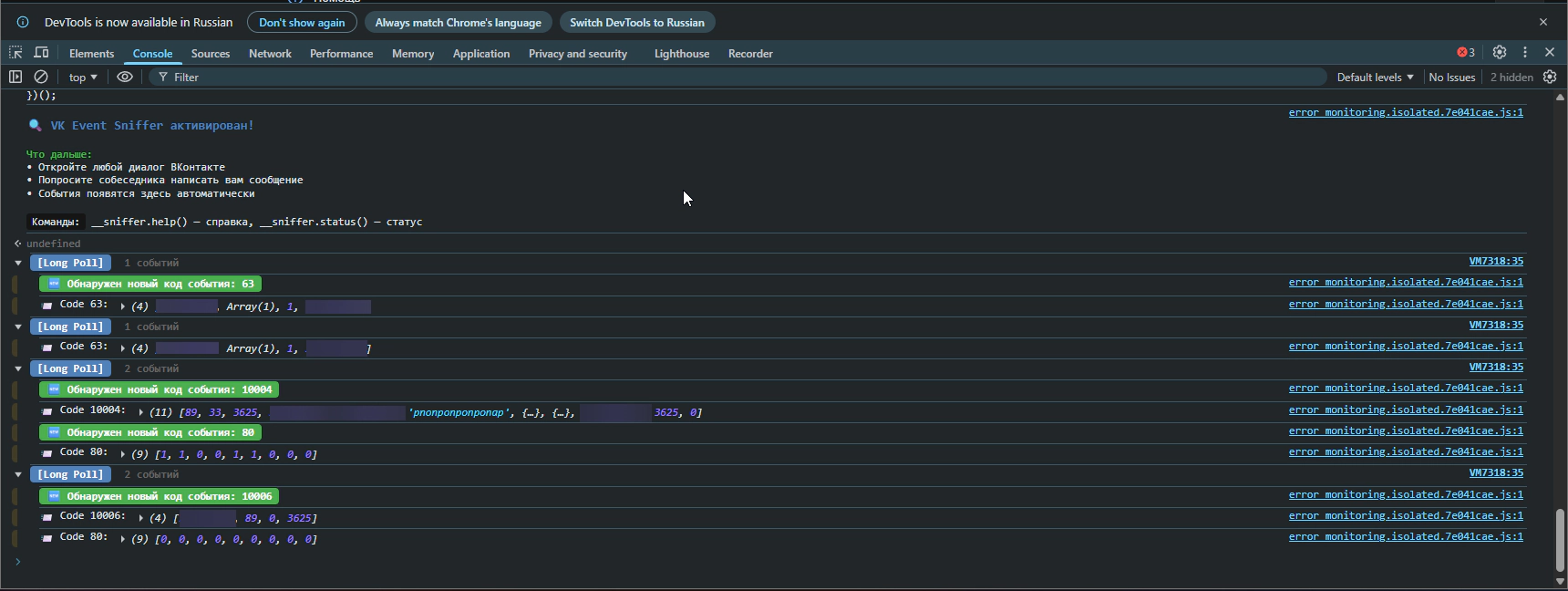
The screenshot shows how the sniffer logs incoming events. Each [Long Poll] group contains a list of events with their codes and data. Note the codes: 63 is the “typing” event, 10004 is a new message, and so on. This is exactly how I gathered information about each event type’s structure.
After collecting enough data, you can call __sniffer.codes() to view statistics:
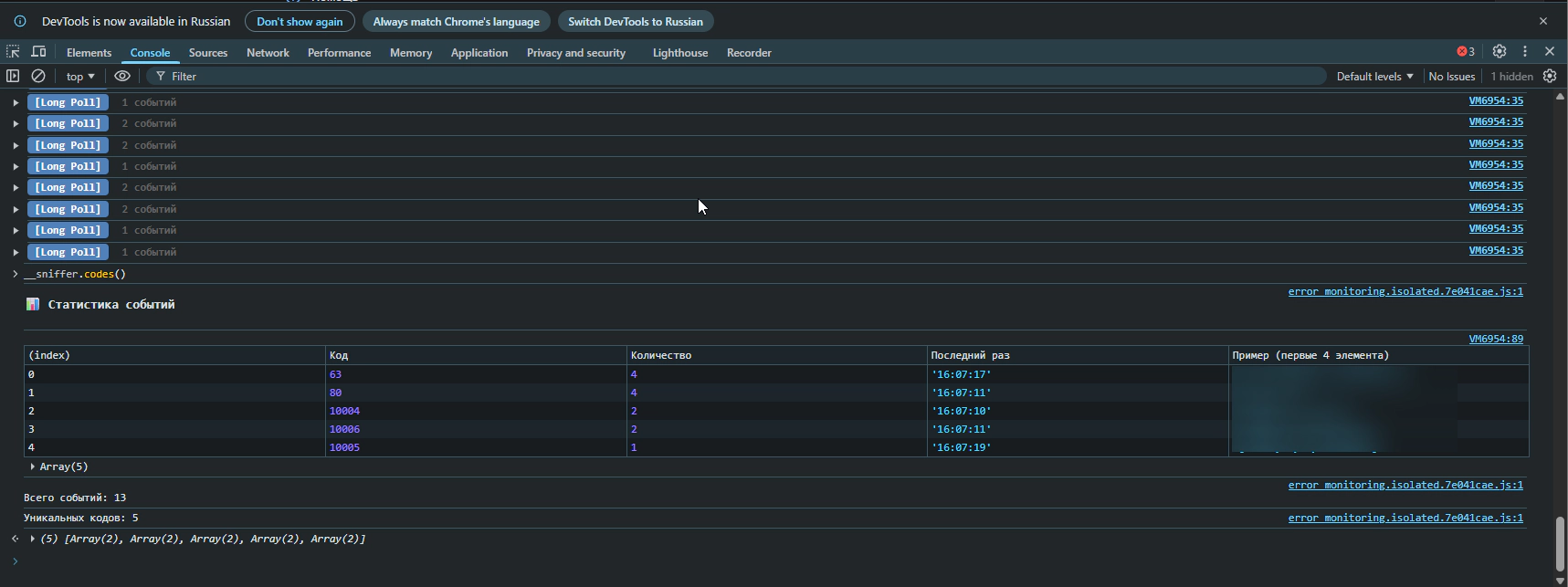
The table shows all discovered event codes, how often each occurred, when it was last seen, and example data. This helps quickly understand which events happen most frequently and which deserve closer analysis.
Step 3: What I Discovered
After several hours of testing with a friend’s help (thanks for putting up with my “send me a message”, “delete the message”, “go offline” requests), I mapped out the events.
Documented Events (Working)
| Code | Event | Structure |
|---|---|---|
| 63 | Typing message |
[63, userId, [chatIds], flag, peerId]
|
| 64 | Recording voice |
[64, userId, [chatIds], flag, timestamp]
|
| 52 | Friend request |
[52, type, userId, ?]
|
| 90 | Friend actions |
[90, actionType, userId]
|
[63, userId, [chatIds], flag, peerId]
[64, userId, [chatIds], flag, timestamp]
[52, type, userId, ?]
[90, actionType, userId]
Message Events (10000+)
| Code | Event | Structure |
|---|---|---|
| 10002 | Deleted for everyone |
[10002, ?, flags, peerId, localId]
|
| 10004 | New message |
[10004, ?, flags, ?, fromId, peerId, text, {...}]
|
| 10005 | Edit |
[10005, ?, flags, fromId, timestamp, text, {...}]
|
| 10007 | Read message |
[10007, peerId, ?, ?, msgId]
|
[10002, ?, flags, peerId, localId]
[10004, ?, flags, ?, fromId, peerId, text, {...}]
[10005, ?, flags, fromId, timestamp, text, {...}]
[10007, peerId, ?, ?, msgId]
Event 90 Subcodes (Friends)
| Subcode | Meaning |
|---|---|
| 1 | Sent friend request |
| 2 | Accepted your request |
| 3 | Removed you from friends |
Step 4: The Online Status Mystery
According to documentation, events 8 (online) and 9 (offline) should come through Long Poll. But I wasn’t seeing them!
I expanded the search and started intercepting all network requests:
/**
 * Universal network sniffer
 */
(function() {
  const originalFetch = window.fetch;
  const keywords = ['online', 'offline', 'last_seen', 'presence'];

  window.fetch = async function(url, options) {
    const response = await originalFetch.apply(this, arguments);

    try {
      const clone = response.clone();
      const text = await clone.text();

      // Search for keywords
      const found = keywords.filter(kw => text.toLowerCase().includes(kw));

      if (found.length > 0) {
        console.log(`%c[MATCH: ${found.join(', ')}]%c ${url}`,
          'background: #4CAF50; color: white; padding: 2px 6px;', '');
        console.log(text.substring(0, 500));
      }
    } catch (e) {}

    return response;
  };

  console.log('✅ Network sniffer activated. Searching for:', keywords.join(', '));
})();
And then I noticed something interesting in the logs:
[WebSocket CREATED] wss://eh.vk.com/?v=1.000&format=json&app_id=6287487
It appears VKontakte moved online statuses to WebSocket!
Step 5: WebSocket Interception
WebSocket is a different protocol, and intercepting it requires a different approach:
/**
 * WebSocket sniffer for VK
 */
(function() {
  const OriginalWebSocket = window.WebSocket;

  window.WebSocket = function(url, protocols) {
    console.log('%c[WS Created]%c ' + url,
      'background: #9C27B0; color: white; padding: 2px 6px;', '');

    const ws = protocols
      ? new OriginalWebSocket(url, protocols)
      : new OriginalWebSocket(url);

    ws.addEventListener('message', async function(event) {
      let data = event.data;

      // Data may come as Blob
      if (data instanceof Blob) {
        const buffer = await data.arrayBuffer();
        const bytes = new Uint8Array(buffer);
        // First byte is message type, rest is JSON
        const jsonStr = new TextDecoder().decode(bytes.slice(1));
        try {
          data = JSON.parse(jsonStr);
        } catch (e) {
          data = jsonStr;
        }
      }

      console.log('%c[WS Message]%c',
        'background: #2196F3; color: white; padding: 2px 6px;', '', data);
    });

    return ws;
  };

  // Copy constants
  window.WebSocket.CONNECTING = OriginalWebSocket.CONNECTING;
  window.WebSocket.OPEN = OriginalWebSocket.OPEN;
  window.WebSocket.CLOSING = OriginalWebSocket.CLOSING;
  window.WebSocket.CLOSED = OriginalWebSocket.CLOSED;

  console.log('✅ WebSocket sniffer activated');
})();
Data through eh.vk.com arrives in binary format. I managed to partially decode it, but couldn’t fully figure out the protocol — data came as Blob, and after decoding the first byte (message type), JSON remained, but the structure was complex.
Important: I can’t state with 100% certainty that online statuses go through this WebSocket. They might be transmitted differently, or VK might use a combination of methods. If you manage to dig deeper — let me know, I’d be interested!
For my project, I decided not to spend more time on this and removed the online status tracking feature.
Production-Ready Spy Module
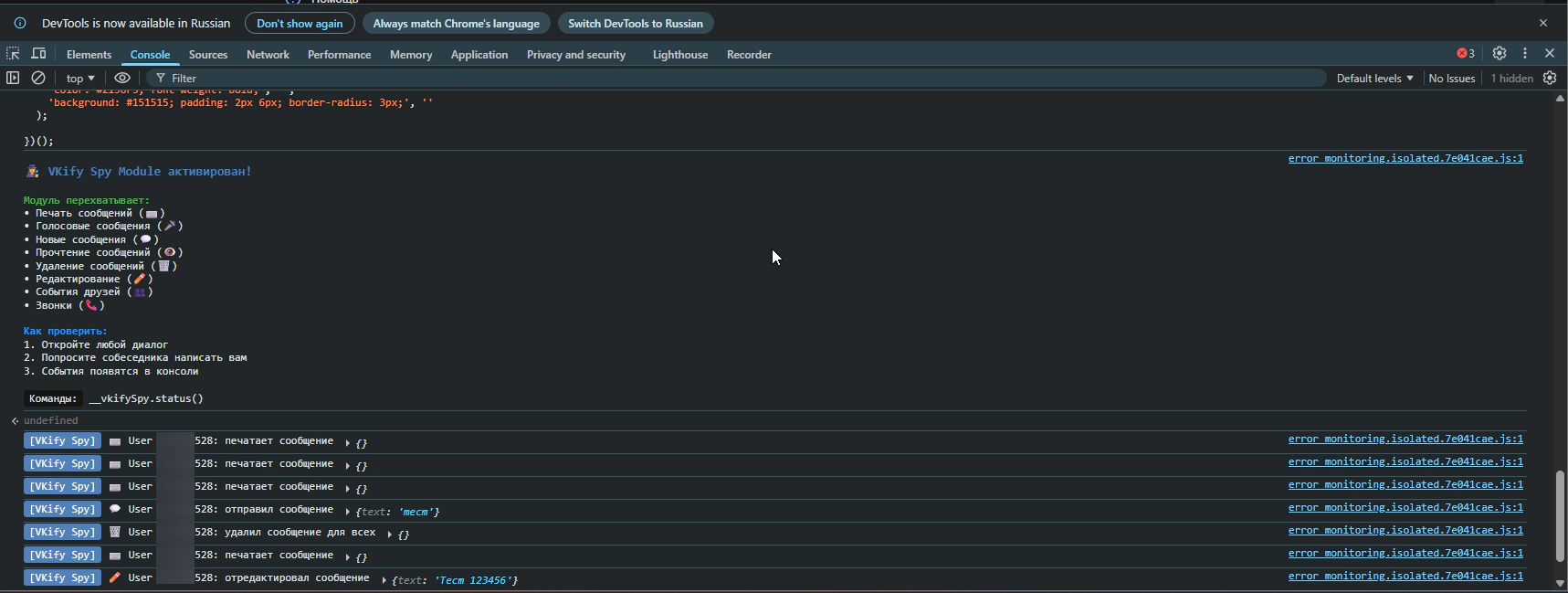
Based on my research, I wrote a production-ready module. It displays a message on activation and logs all recognized events:
/**
 * VKify Spy Module
 * Production version for browser extension
 *
 * Usage:
 * 1. Paste into console on VK page
 * 2. Open a chat and wait for events
 * 3. Or subscribe to events: window.addEventListener('vkify-spy-event', e => console.log(e.detail))
 */
(function() {
  'use strict';

  if (window.__vkifySpyModule) {
    console.log('[VKify Spy] Already running');
    return;
  }
  window.__vkifySpyModule = true;

  // Event configuration (gathered through reverse engineering)
  const EVENT_CONFIG = {
    63: { action: 'is typing a message', icon: '⌨️', category: 'typing' },
    64: { action: 'is recording voice', icon: '🎤', category: 'voice' },
    52: { action: 'friend event', icon: '👥', category: 'friends' },
    90: { action: 'friend event', icon: '👥', category: 'friends' },
    115: { action: 'is calling you', icon: '📞', category: 'calls' },
    10002: { action: 'deleted message for everyone', icon: '🗑️', category: 'delete' },
    10004: { action: 'sent a message', icon: '💬', category: 'messages' },
    10005: { action: 'edited a message', icon: '✏️', category: 'edit' },
    10007: { action: 'read a message', icon: '👁️', category: 'read' }
  };

  let eventCount = 0;

  function parseEvent(update) {
    const code = update[0];
    const config = EVENT_CONFIG[code];
    if (!config) return null;

    let userId = null;
    let extra = {};

    switch (code) {
      case 63: case 64:
        userId = update[1];
        break;
      case 52:
        userId = update[2];
        extra.type = update[1];
        break;
      case 90:
        userId = update[2];
        extra.actionType = update[1];
        break;
      case 115:
        userId = update[1]?.user_id || update[1]?.peer_id;
        break;
      case 10002:
        userId = update[3];
        break;
      case 10004:
        if (update[2] & 2) return null; // Outgoing message
        userId = update[4];
        extra.text = update[6]?.substring(0, 100);
        break;
      case 10005:
        if (update[2] & 2) return null;
        userId = update[3];
        extra.text = update[5]?.substring(0, 100);
        break;
      case 10007:
        userId = update[1];
        break;
    }

    if (!userId) return null;

    return { code, userId, ...config, extra, timestamp: new Date().toISOString() };
  }

  // Long Poll interception
  const originalFetch = window.fetch;

  window.fetch = async function(url, options) {
    const response = await originalFetch.apply(this, arguments);

    if (/api\.vk\.com\/ruim/.test(url?.toString() || '')) {
      try {
        const clone = response.clone();
        const data = await clone.json();

        data.updates?.forEach(update => {
          const event = parseEvent(update);
          if (event) {
            eventCount++;
            console.log(
              `%c[VKify Spy]%c ${event.icon} User ${event.userId}: ${event.action}`,
              'background: #5181b8; color: white; padding: 2px 6px; border-radius: 3px;',
              'color: inherit;',
              event.extra
            );

            // Dispatch custom event for subscribers
            window.dispatchEvent(new CustomEvent('vkify-spy-event', {
              detail: event
            }));
          }
        });
      } catch (e) {}
    }

    return response;
  };

  // Public API
  window.__vkifySpy = {
    getEventCount: () => eventCount,
    getConfig: () => EVENT_CONFIG,
    status() {
      console.log(`[VKify Spy] Active. Events intercepted: ${eventCount}`);
    }
  };

  console.log(`
%c🕵️ VKify Spy Module activated!%c

%cModule intercepts:%c
• Message typing (⌨️)
• Voice messages (🎤)
• New messages (💬)
• Read receipts (👁️)
• Message deletion (🗑️)
• Message edits (✏️)
• Friend events (👥)
• Calls (📞)

%cHow to test:%c
1. Open any chat
2. Ask someone to message you
3. Events will appear in console

%cCommands:%c __vkifySpy.status()
`,
    'color: #5181b8; font-weight: bold; font-size: 14px;', '',
    'color: #4CAF50; font-weight: bold;', '',
    'color: #2196F3; font-weight: bold;', '',
    'background: #151515; padding: 2px 6px; border-radius: 3px;', ''
  );

})();
Conclusions and Recommendations
What I Learned
- Long Poll still works for most messenger events
- Online statuses may have moved to WebSocket (
eh.vk.com) — data arrives in binary format, couldn’t fully decode it - Event structure doesn’t always match documentation — testing required
- Codes 10000+ — these are “new” message events
Reverse Engineering Tips
- Start simple — basic fetch interception gives 80% of the information
- Collect statistics — save examples of each event type
- Test with a helper — some events are only visible from the other side
- Check WebSocket — modern apps increasingly use it
- Document your findings — in a month you’ll forget what
update[3]means
Ethics
Remember that data interception is a tool. Use it for:
- ✅ Improving your own user experience
- ✅ Educational purposes
- ✅ Developing useful tools
And don’t use it for:
- ❌ Tracking people without their knowledge
- ❌ Collecting others’ personal data
- ❌ Violating service ToS
Useful Links
- VK Long Poll Server Documentation — official docs (incomplete)
- Chrome DevTools Network Panel — for request analysis
- MDN: Fetch API — for understanding interception
- MDN: WebSocket — for WS work
Article written as part of VKify development